Language
Language plays a crucial role in shaping the user experience of the products of OPTIMAL SYSTEMS. A consistent, clear, and translation-friendly writing style strengthens product usability and supports internationalization. This chapter outlines the key principles for writing UI texts for the products in enaio® and yuuvis®.
Voice & Tone
Section titled “Voice & Tone”Our Voice
Section titled “Our Voice”We speak with trustworthiness, expertise, efficiency, and support. Our software exists to make complex document work easier and frictionless through state‑of‑the‑art professional tools. The voice is factual—no start‑up slang—using precise, concise wording. Maintain a formal B2B tone, with occasional playful touches where appropriate. Be clear, direct, and never use blame language.
Our Users
Section titled “Our Users”- End users: Case workers and specialists. They are savvy with documents and digital records but not with what happens “under the hood.” Adult users spanning all ages. They see the client UIs of our components. They need clear, concise, conversational guidance—never developer jargon.
- Admins: Handle configuration in our admin tools and require specific technical details. Use a more formal, matter‑of‑fact tone. Messages can be longer when needed, but always remain clear.
Tone Guidelines by UI Element
Section titled “Tone Guidelines by UI Element”- Placeholders for search fields/form fields: Neutral, clear; conversational where helpful.
- Error messages/toasters: Calm, matter‑of‑fact, helpful; state what happened and how to fix it.
- Inline validation messages: Matter-of-fact, helpful; state which information is needed to fix it.
- Warnings: Serious, matter‑of‑fact; explain impact and action.
- Success toasters: Positive, brief, not hyped.
- Dialogs requiring interaction: Clear directions, concise, conversational.
- Dialogs for deletion or irreversible actions: Clear directions, information about the consequence, concise, conversational.
- Empty states (incl. empty hit lists and first-use empty states): Encouraging, not hyped; nudge to next steps.
- Start screens: Welcoming, concise, not hyped.
- Buttons: Neutral, clear, consistent verbs.
- Context menus: Neutral, clear, consistent labels.
- Loading and progress indicators: Neutral.
- Badges: Short, precise.
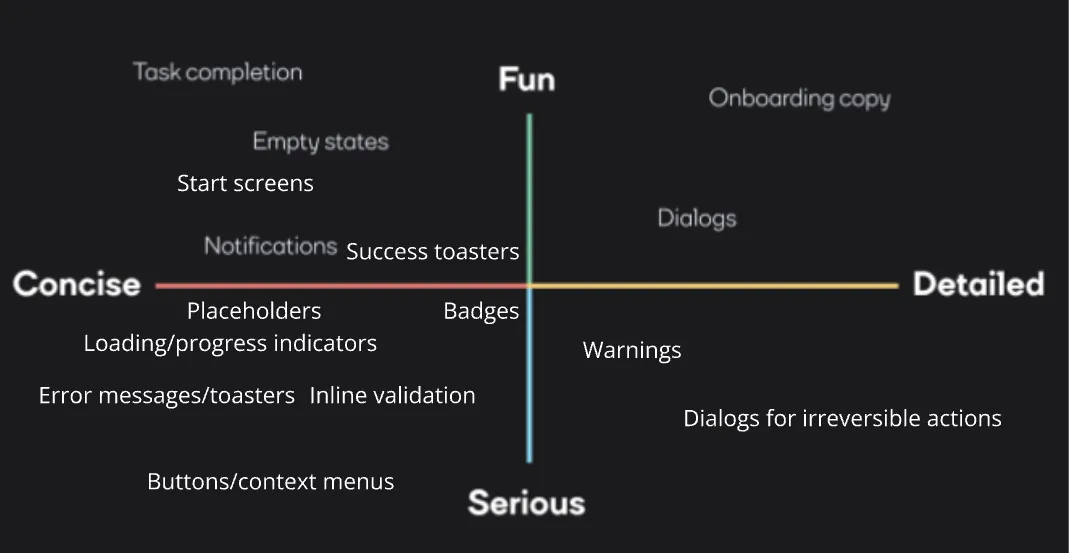
Examples
Section titled “Examples”Do This, Not That
Section titled “Do This, Not That”- Error
- ✅ Do: “Unable to upload files. Try again or use a smaller file (max 50 MB).”
- ❌ Not: “Upload failed due to server exception. User error.”
- Empty state
- ✅ Do: “No results. Adjust filters or try a different keyword.”
- ❌ Not: “Nothing here! Our AI couldn’t find anything.”
- Success message
- ✅ Do: “Document archived successfully.”
- ❌ Not: “Awesome! Your doc is now living its best life.”
- Dialog
- ✅ Do: “Do you want to replace the existing version? Replacing updates links in all cases.”
- ❌ Not: “Proceed with overwrite? This will trigger backend jobs.”
- General UI
- ✅ Do: “Processing… This may take up to 2 minutes.”
- ❌ Not: “Hang tight! We’re crunching bits.”
Don’ts
Section titled “Don’ts”- Avoid dev jargon; focus on what users see and need to do, not backend details.
- Do not use blame language in errors.
- No overly hyped or startup‑style phrasing.
- Don’t sacrifice clarity for brevity; short, clear, and specific wins.
- Formal B2B tone first; playful sprinkles only when context allows.
Core Principles
Section titled “Core Principles”- Consistency First: Use consistent terminology and phrasing across all UI components (e.g., the menu action that opens a dialog matches the dialog title)
- Clear and Concise: Write short, direct texts. Avoid nested sentences and unnecessary filler words.
- Action-Oriented: Use meaningful verbs and phrase actions in the infinitive (e.g., Delete document / Dokument löschen, Reset filter / Filter zurücksetzen).
- Positive Tone: Use user-friendly, constructive language. Blame the system, not the user, in error messages.
UI Text Types and Rules
Section titled “UI Text Types and Rules”Actions (Buttons, Checkboxes, Radio Buttons, Menu Actions)
Section titled “Actions (Buttons, Checkboxes, Radio Buttons, Menu Actions)”- Use precise action verbs (e.g., Speichern, Löschen).
- Avoid generic labels like OK unless no clearer alternative exists.
- Capitalize only the first letter of the string (sentence case)
- Keep the verb-object order for compound actions (e.g., Create subscription/Abonnement anlegen).
- Keep the wording of actions that belong together (e.g., a set of radio buttons) consistent
Dialogs
Section titled “Dialogs”- Title: Infinitive form or configuration noun (Create new folder / Neuen Ordner anlegen, User administration / Benutzerverwaltung) → the dialog repeats the action from the action button or menu item
- Capitalize only the first letter of the title string (sentence case)
- Content: Clear, direct instruction or question, inform about consequences of the action
- Buttons: Use explicit verbs for the confirming action and Abbrechen/Cancel for the canceling action. Do not use Yes and No.
Example Dialog
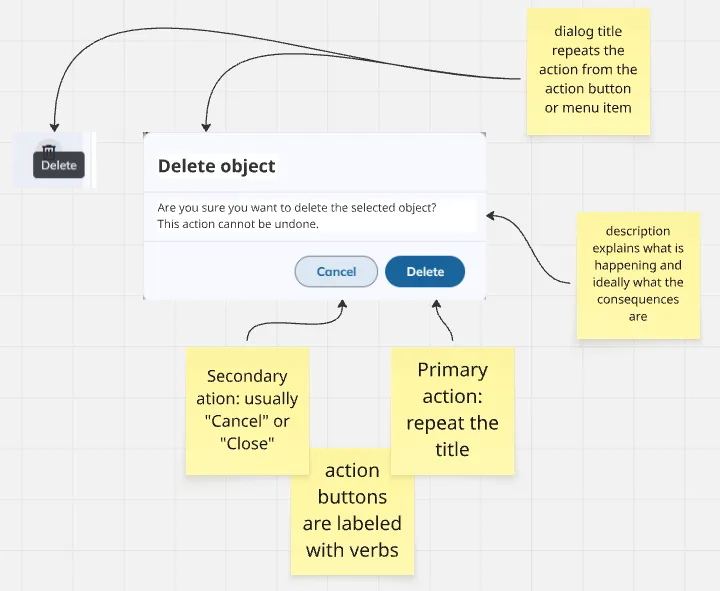
Tooltips
Section titled “Tooltips”- Phrase as a short command (Open filter/Filter öffnen, Sort entries/Einträge sortieren)
- Start with a capital letter
- Only use a period if the tooltip consists of complete sentences
- No additional explanations unless needed (e.g., in ribbon tooltips)
Example Tooltips
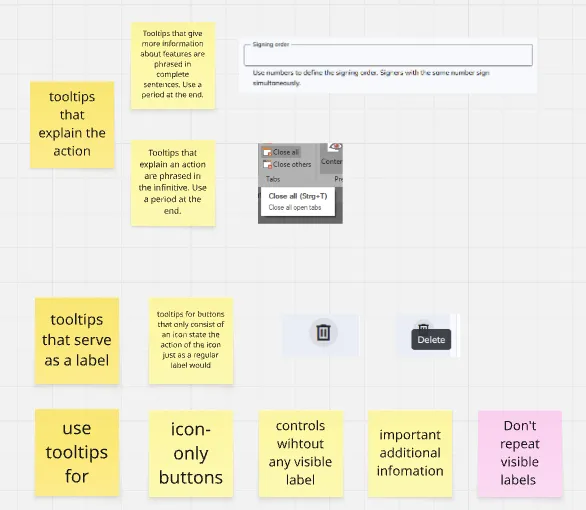
Placeholders
Section titled “Placeholders”- Give example content for form fields where helpful, e.g., a specific format for a phone number
- Indicate the action for search fields, be conversational where adequate, e.g., “Search cabinet” or “What are you looking for today?”
Inline Validation
Section titled “Inline Validation”- Clearly state why the user’s input is invalid and give directions on how to fix it.
- Use positive phrases and explain what the input should look like, not what it shouldn’t look like, e.g.:
- ✅ “The end date must be in the future.”
- ❌ “The end date must not be in the past.”
Badges
Section titled “Badges”- Make badges as short as possible, ideally one to two words
- Use badges to indicate status
Messages
Section titled “Messages”- Status/toaster messages: Short, complete sentences describing what happened
- Error messages: Use the XYZ pattern: An error has occurred (X). This can happen if Y. Please do Z.
- Address users directly using Sie in German. Use the verb “möchten” instead of “wollen”.
- Use the same sentence structure for user questions (use direct speech)
Example Toasters
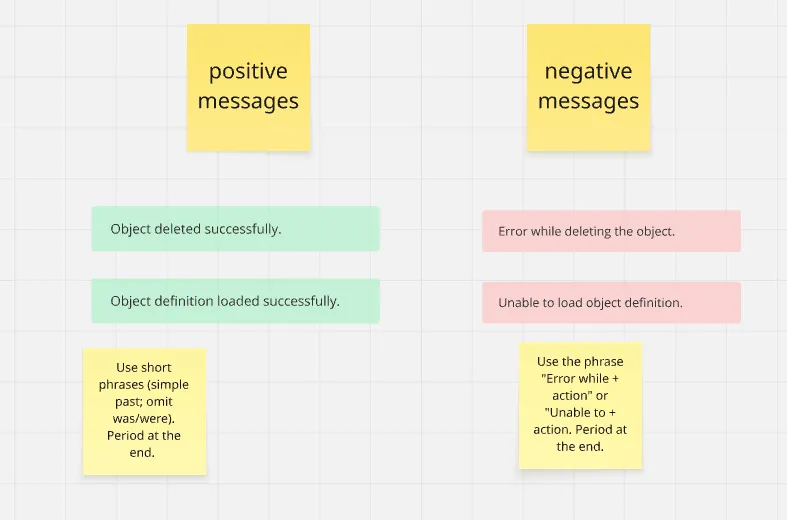
Internationalization Guidelines
Section titled “Internationalization Guidelines”- Source language: German (German teams) or US English (Belgrade teams)
- Translation readiness:
- Avoid synonyms and ambiguous phrasing.
- Use consistent placeholders for variables (e.g.,
{0},%s) and quote styles. - Avoid German-specific idioms and nested constructs in English.
- Always use complete strings for UI texts. Don’t combine multiple strings at runtime, because this doesn’t work for all languages due to different syntax.